Mobile Client Update Process Automation
Mobile Client Update Process Automation
Please note this feature has not been implemented in the app.
The current process of updating client mobile applications involves several manual steps, requiring staff and clients to communicate regarding multiple images of varying dimensions. This process is slow and error prone, requiring time to complete. The following document describes how the designer application may be updated to include functionality which will allow much of the asset gathering to be done without the intervention of HungerRush Staff.
Overview
The HungerRush Designer application will be updated to have a new section dedicated to the management of the basic assets required for the mobile application. This will take the form of a menu item for a site, which will take the user to a page which shows the following information:
- A preview of the current state of the mobile application assets. The preview will use primary and secondary colors as per the latest published designer website.
- A form, with an image preview, allowing users to update assets by uploading new images for each of the following
types:
- Logo
- App Icon
- Splash Screen
- Featured Graphic
- The form will include text fields which will be used to set the app name and description.
- A submit button which will “publish” the current set of images, colors, app name and description.
- Basic Publication history, including links to images which were previously published.
Process
The high level process for a user and HungerRush staff will be as follows:
- The user logs into designer using their existing HungerRush credentials
- The user selects a site to update from the existing Site Selector
- The user selects the Mobile Look and Feel menu item
- A new page is presented to the, as described in the Overview
- The user sets the app’s name and description, and uses the uploaders to upload the 4 required image types
- When the user is ready with the appearance of the preview, the user presses the Submit button.
- The Designer backend receives a notification containing the details of the images, name, description and colors.
- The backend uses this information, in concert with a new image processing service, to create new assets of the various dimensions required
- The user and HungerRush staff receive an email notifying them of the request to update the user’s app. This email will contain all of the color codes, the text data, and links to the various files.
Architecture
The new functionality required for the Designer System to achieve this functionality are as follows:
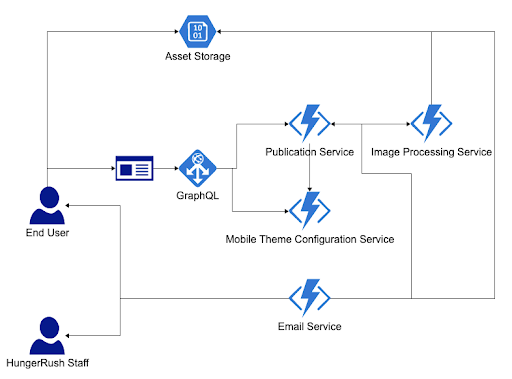
- The Designer web application will need a new menu item, and view for managing this processes
- The Designer web application will need to integrate with a new GraphQL query which will allow the user to see what the current state of the form is, as well as the publication history
- The Designer web application will need to integration with a new GraphQL mutation which will allow the user to request an app update with the current application
- The Designer backend will require a new service for storing state information regarding the user’s set of assets and configuration for the mobile application. This service should also store historical data for previous publications. This will be achieved with an event-sourced approach to keep track of the current state, as well as historical data.
- Image Processing Service. This service is responsible for processing user images and creating all of the required assets for a mobile app update.
- A basic email service which will notify the user and HungerRush staff when an update is requested